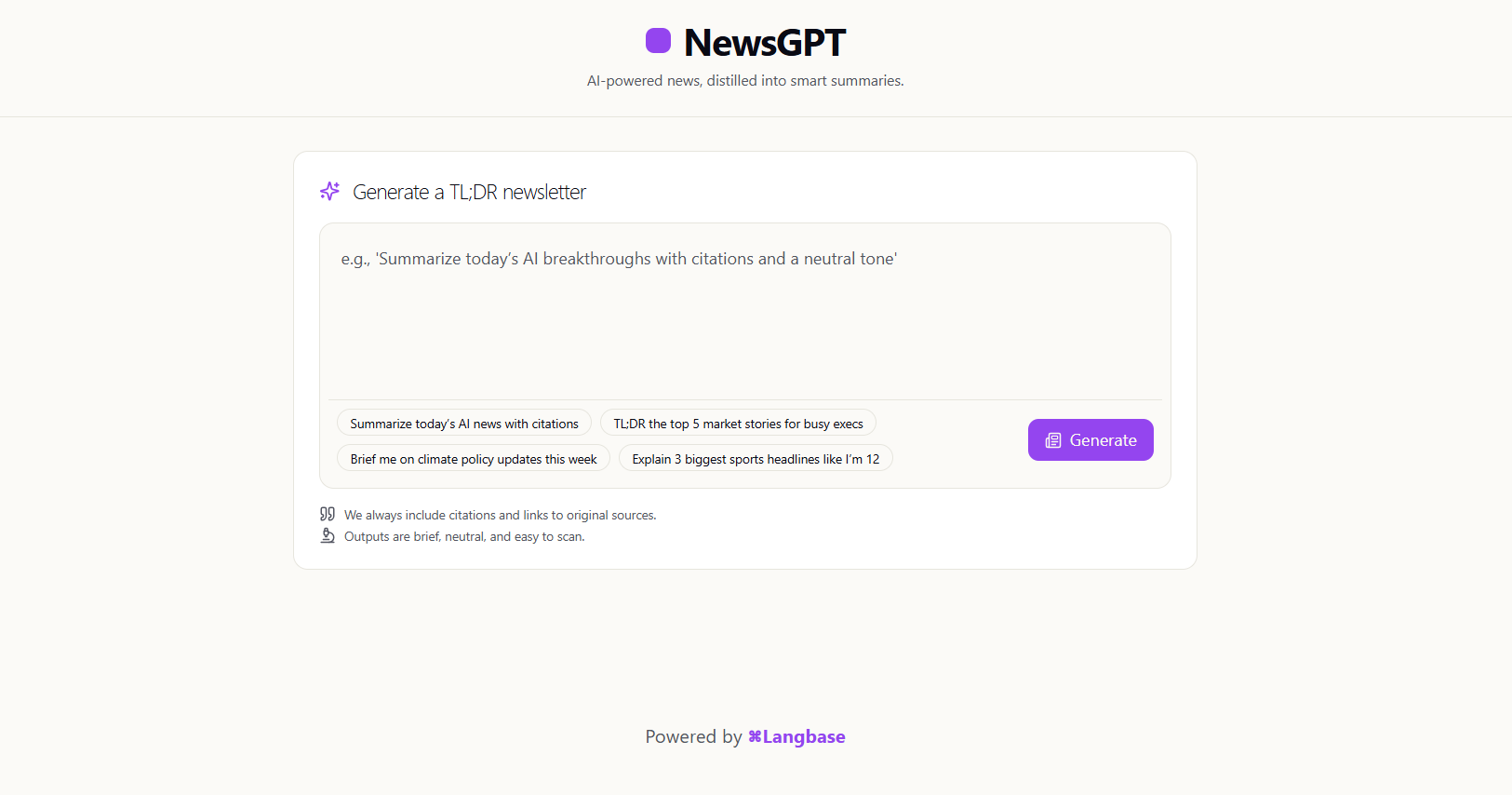
In this post, you'll learn how to build newsGPT, an AI-powered app that transforms long-form news into concise one-liner headlines. With Langbase SDK, you can create workflows that summarize and organize stories into an engaging TL;DR format.
You can find the open source code in the Langbase examples repository.
Overview
The newsGPT enables you to:
- Summarize long news articles into short, scannable headlines
- Generates a personalized AI/tech news experience to cater to your needs
- Preserve and highlight only the important details while cutting the fluff
- Use pre-written prompts for quick news creation
The agent is built using Langbase primitives and Langbase web search.
Architecture overview
This demo is built using the following tech stack:
- Frontend: React + TypeScript for a clean, modern UI
- Backend: Cloudflare Workers for lightweight, serverless execution
- AI Layer: Langbase workflows for structured summarization
- Langbase Web Search: Crawling web for relevant news articles
Project structure
How Langbase powers this agent?
1. Agent workflow setup
First, it defines a workflow primitive to keep things structured:
1import { Langbase } from "langbase"
2
3interface newsGPTParams {
4  input: string;
5  env: NewsGPTEnv;
6}
7
8export async function newsGPT({ input, env }: newsGPTParams) {
9  const langbase = new Langbase({ apiKey: env.LANGBASE_API_KEY });
10
11  const workflow = langbase.workflow();
12  const { step } = workflow;
13
14  const processResult = await step({
15    id: "process_news",
16    run: async () => {
17      const response = await langbase.agent.run({
18        model: "openai:gpt-4.1-mini",
19        apiKey: env.OPENAI_API_KEY!,
20        instructions: `
21        You are an AI news analyst specializing in technology trends...
22      `,
23        input: [
24          {
25            role: "user",
26            content: `Here are the latest AI news articles.
27            Please analyze them and create newsletter items:\n\n${searchResults.map(result => `URL: ${result.url}\nContent: ${result.content}`).join('\n\n')
28              }`
29          }
30        ],
31        stream: false,
32        response_format: {
33          type: "json_schema",
34          json_schema: {
35            name: "NewsletterItems",
36            schema: jsonSchema,
37            strict: true,
38          },
39        },
40      });
41
42      const parsed = JSON.parse(response.output);
43      return parsed;
44    }
45  });
46
47  return processResult
48}
2. Langbase web search tool
It uses Exa search capability with Langbase web search.
1const searchResults = await step({
2  id: "search_ai_news",
3  run: async () => {
4    const query = input;
5
6    return await langbase.tools.webSearch({
7      service: 'exa',
8      query: query,
9      totalResults: 5,
10      apiKey: env.EXA_API_KEY!
11    });
12  }
13});
3. Structured outputs
Uses structured outputs to enforce consistent results from LLM.
1import { z } from "zod";
2import { zodToJsonSchema } from "zod-to-json-schema";
3
4const newsItemSchema = z.object({
5  summary: z.string(),
6  url: z.string(),
7  source: z.string(),
8});
9
10const newsItemsSchema = z.object({
11  newsItems: z.array(newsItemSchema)
12});
13
14const jsonSchema = zodToJsonSchema(newsItemsSchema, { target: 'openAi' });
4. API endpoint setup
The Cloudflare Worker exposes the agent through a simple API:
1type Bindings = {
2  LANGBASE_API_KEY: string;
3  OPENAI_API_KEY: string;
4  EXA_API_KEY: string;
5};
6
7export const registerLangbaseEndpoint = (app: Hono<{ Bindings: Bindings }>) => {
8  app.post("/api/langbase", async (c: Context<{ Bindings: Bindings }>) => {
9    const { input } = await c.req.json();
10
11    const output = await newsGPT({
12      input,
13      env: c.env, // pass Worker environment vars
14    });
15
16    return c.json({ output }, 200);
17  });
18};
Explore the open source code here.
Key Langbase features used
- Workflow primitive: Orchestrates multi-step agent operations
- Langbase Web Search: Langbase-hosted web search tool
- Agent primitive: Handles LLM interactions with context management
Getting started
To run this agent locally, follow these steps:
Prerequisites
- Node.js 21+
- A Langbase account and API key
- OpenAI API key
- EXA API key
1. Clone and install dependencies
Run the following commands to clone the project and install dependencies:
1npx degit LangbaseInc/langbase-examples/examples/newsgpt newsgpt && cd newsgpt
2npm install
3cp .env.example .env
2. Environment setup
Fill in your API keys in .env:
# Get from: https://langbase.com/docs/api-reference/api-keys
LANGBASE_API_KEY="your_langbase_api_key"

# Get from: https://platform.openai.com/api-keys
OPENAI_API_KEY="your_openai_api_key"

# Get from: https://exa.ai/
EXA_API_KEY="your_exa_api_key"
3. Run the deveoplment server
The following command will spin up a local server:
1npm run devVisit http://localhost:5173 to start using your local newsGPT.
Example prompts
Try these natural language prompts to get started
- Summarize today's AI news with citations
- Give me the latest funding rounds for AI tech companies
- Brief me on climate policy updates this week
- Explain the 3 biggest sports headlines like I'm 12
Key components explained
Frontend (React)
The UI is built with modern React patterns:
1type NewsItem = {
2  summary: string;
3  url: string;
4  source: string;
5};
6
7export function App() {
8  const [response, setResponse] = useState<NewsItem[]>([]);
9  const [loading, setLoading] = useState(false);
10
11  // rest of the code...
12}
Worker backend (Hono)
Cloudflare Workers handle the serverless backend:
1import { Hono } from 'hono';
2import { registerLangbaseEndpoint } from './langbase';
3
4const app = new Hono();
5app.use('*', cors());
6
7// Register the Langbase agent endpoint
8registerLangbaseEndpoint(app);
9
10export default {
11  fetch(request: Request, env: Bindings, ctx: any) {
12    return app.fetch(request, env, ctx)
13  }
14}
Agent instructions
The agent is configured with special instructions:
1Instructions: `You are an AI news analyst specializing in technology trends.
2Create a newsletter with summaries for each AI news article.
3For each article:
41. One-liner summary
52. Include the source website name
63. Include the full URL
7
8Return a structured JSON with an array of news items.`
Deployment
Deploy to Cloudflare Workers
- Build the project:
1npm run build- Deploy with Wrangler:
1npm run deploy- Set environment variables in Cloudflare:
1wrangler secret put LANGBASE_API_KEY
2wrangler secret put OPENAI_API_KEY
3wrangler secret put EXA_API_KEY
Your agent will be live at https://your-worker.your-subdomain.workers.dev
Learn more
- Langbase Documentation - Complete platform guide
- Langbase Web Search - Langbase Web Search
- MCP Servers - Available integrations
- API Reference - Detailed API reference