
In this blog, we will build an AI coding agent, CodeAlchemist aka Devin, that uses multiple AI Pipes to:
- Analyze the user prompt to identify if it's related to coding, database architecture, or a random prompt.
- Based on user prompt, decide whether to call AI code Pipe or database Pipe
- Generate raw React code for code query
- Generate optimized SQL for database query
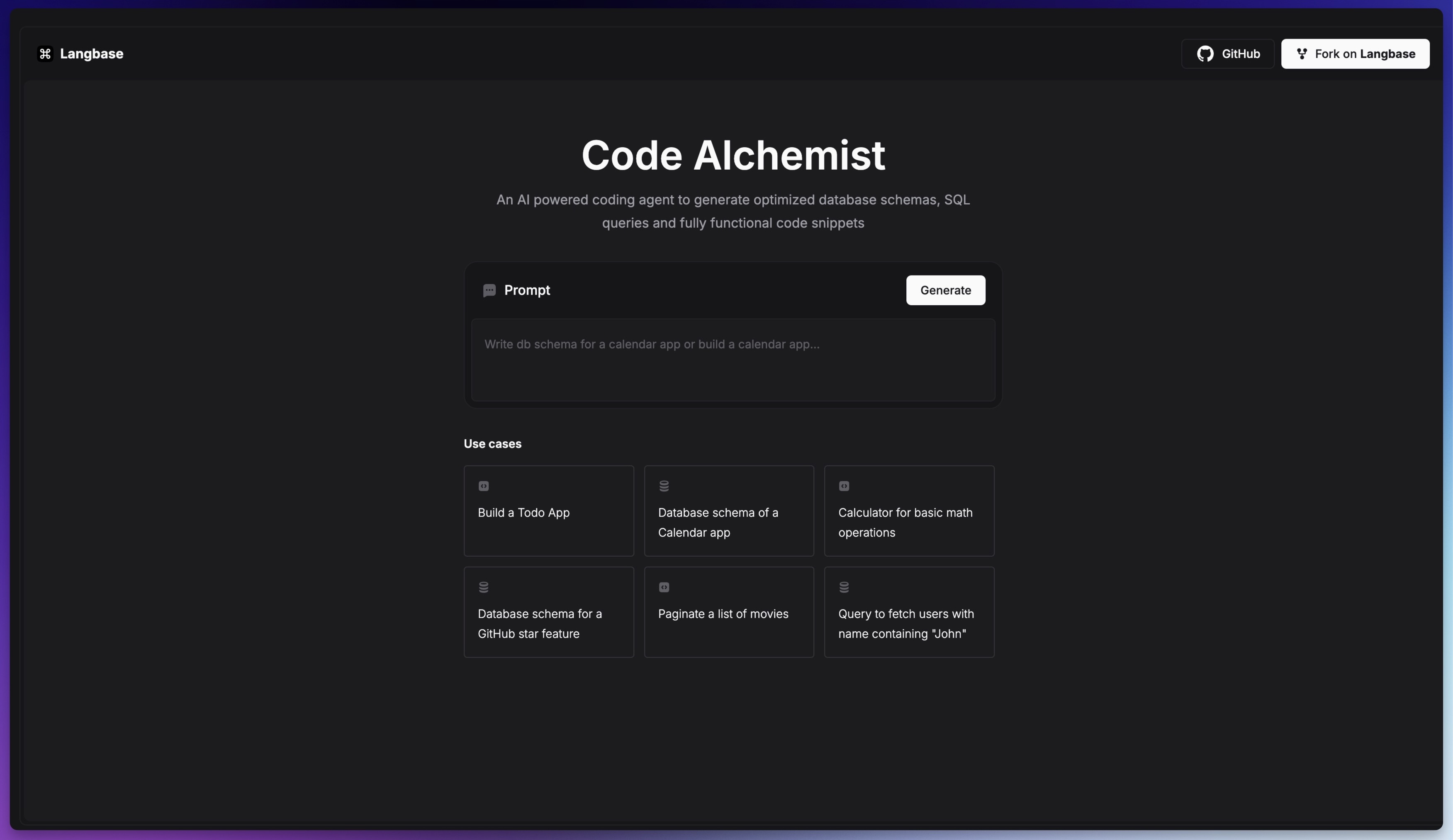
We will create a basic Next.js application that will use the Langbase SDK to connect to the AI Pipes and stream the final response back to user.
Let's get started!
Step 0: Create a Next.js Application
To build the agent, we need to have a Next.js starter application. If you don't have one, you can create a new Next.js application using the following command:
1npx create-next-app@latest code-alchemist
2
3# or with pnpm
4pnpx create-next-app@latest code-alchemist
This will create a new Next.js application in the code-alchemist directory. Navigate to the directory and start the development server:
1cd code-alchemist
2npm run dev
3
4# or with pnpm
5pnpm run dev
Step 1: Install Langbase SDK
Install the Langbase SDK in this project using npm or pnpm.
1npm install langbase
2
3# or with pnpm
4pnpm add langbase
Step 2: Fork the AI pipes
Fork the following AI Pipes in Langbase dashboard. These Pipes will power CodeAlchemist:
- Code Alchemist: Decision maker Pipe. Analyze user prompt and decide which AI Pipe to call.
- React Copilot: Generates a single React component for a given user prompt.
- Database Architect: Generates optimized SQL for a query or entire database schema
When you fork a Pipe, navigate to the API tab located in the Pipe's navbar. There, you'll find API keys specific to each Pipe, which are essential for making calls to the Pipes using the Langbase SDK.
Create a .env.local file in the root directory of your project and add the following environment variables:
1# Replace `PIPE_API_KEY` with the copied API key of Code Alchemist Pipe.
2LANGBASE_CODE_ALCHEMY_PIPE_API_KEY="PIPE_API_KEY"
3
4# Replace `PIPE_API_KEY` with the copied API key of React Copilot Pipe.
5LANGBASE_REACT_COPILOT_PIPE_API_KEY="PIPE_API_KEY"
6
7# Replace `PIPE_API_KEY` with the copied API key of Database Architect Pipe.
8LANGBASE_DATABASE_ARCHITECT_PIPE_API_KEY="PIPE_API_KEY"
Step 3: Create a Generate API Route
Create a new file app/api/generate/route.ts. This API route will generate the AI response for the user prompt. Please add the following code:
1import { callPipes } from '@/utils/call-pipes';
2import { getPipeApiKeys } from '@/utils/get-pipe-api-keys';
3import { validateRequestBody } from '@/utils/validate-request-body';
4
5export const runtime = 'edge';
6
7export async function POST(req: Request) {
8	try {
9		const { prompt, error } = await validateRequestBody(req);
10
11		if (error || !prompt) {
12			return new Response(JSON.stringify(error), { status: 400 });
13		}
14
15		const keys = getPipeApiKeys();
16
17		const { stream, pipe } = await callPipes({
18			keys,
19			prompt
20		});
21
22		if (stream) {
23			return new Response(stream.toReadableStream(), {
24				headers: {
25					pipe
26				}
27			});
28		}
29
30		return new Response(JSON.stringify({ error: 'No stream' }), {
31			status: 500
32		});
33	} catch (error: any) {
34		console.error('Uncaught API Error:', error.message);
35		return new Response(JSON.stringify(error.message), { status: 500 });
36	}
37}
When the /api/generate endpoint is called, the request is first validated using the validateRequestBody function. If the validation passes, the Pipe API keys are retrieved from the .env.local file, and the callPipes function is called with the user prompt and Pipe API keys.
The callPipes function calls the AI Pipes and returns a stream with the final AI response, which is then sent back to the user. We will define callPipes function in the next step.
You can find all these functions in the utils directory of the CodeAlchemist source code.
Step 4: Decision Maker Pipe
The Code Alchemist Pipe is a decision-making Pipe. It contains two LLM functions, runPairProgrammer and runDatabaseArchitect, which are called depending on the user's query.
Create a new file app/utils/call-pipes.ts. This file will contain the logic to call all the AI Pipes and stream the final response back to the user. Please add the following code:
1import 'server-only';
2
3import { Pipe } from 'langbase';
4
5type Params = {
6	prompt: string;
7	keys: {
8		REACT_COPILOT_PIPE_API_KEY: string;
9		CODE_ALCHEMY_PIPE_API_KEY: string;
10		DATABASE_ARCHITECT_PIPE_API_KEY: string;
11	};
12};
13
14type ToolCall = {
15	index: number;
16	id: string;
17	type: string;
18	function: {
19		name: string;
20		arguments: string;
21	};
22};
First we have imported server-only to ensure that this file is only executed on the server. Next we have imported Pipe from the Langbase SDK.
Since we are writing TypeScript, we have defined the incoming function Params type and the ToolCall type.
Now let's define the callPipes function in the same call-pipes.ts file. Add the following code:
1/**
2 * Asynchronously processes the given prompt using Langbase.
3 *
4 * @param {Params} params - The parameters for the Langbase function.
5 * @param {string[]} params.keys - The API keys required for Langbase.
6 * @param {string} params.prompt - The prompt to be processed.
7 * @returns {Promise<{ stream: Stream, pipe: string } | unknown>} - A promise that resolves to an object containing the processed stream and the pipe used, or an unknown value if the tool is called.
8 */
9export async function callPipes({ keys, prompt }: Params) {
10	const codeAlchemistPipe = new Pipe({
11		apiKey: keys.CODE_ALCHEMY_PIPE_API_KEY
12	});
13
14	const { stream } = await codeAlchemistPipe.streamText({
15		messages: [{ role: 'user', content: prompt }]
16	});
17
18	const [streamForCompletion, streamForReturn] = stream.tee();
19
20	let completion = '';
21	let toolCalls = '';
22
23	for await (const chunk of streamForCompletion) {
24		completion += chunk.choices[0]?.delta?.content || '';
25		toolCalls += JSON.stringify(chunk.choices[0].delta?.tool_calls) || '';
26
27		// if the toolCalls is not empty, break the loop
28		if (toolCalls.length) {
29			break;
30		}
31	}
32
33	// if the completion is not empty, return the stream
34	if (completion) {
35		return {
36			pipe: 'code-alchemist',
37			stream: streamForReturn
38		};
39	}
40
41	// if the toolCalls is not empty, call the tool
42	if (toolCalls) {
43		const calledTool = JSON.parse(toolCalls) as unknown as ToolCall[];
44		const toolName: string = calledTool[0].function.name;
45
46		return await AI_PIPES[toolName]({
47			prompt,
48			keys
49		});
50	}
51}
52
53type AI_PIPES_TYPE = Record<string, ({ prompt, keys }: Params) => Promise<any>>;
54
55// Pipes map
56export const AI_PIPES: AI_PIPES_TYPE = {
57	runPairProgrammer,
58	runDatabaseArchitect
59};
60
61async function runPairProgrammer({ prompt, keys }: Params) {}
62
63async function runDatabaseArchitect({ prompt, keys }: Params) {}
Here is a quick explanation of what's happening in the code above:
- Initialized
codeAlchemistPipewithCODE_ALCHEMY_PIPE_API_KEYusing Langbase SDK. - Called
streamTextmethod ofcodeAlchemistPipewith prompt and messages, triggering the Langbase AI Pipe that returned a stream. - Used
teeto split the stream into two. - Iterated over
streamForCompletion, appending chunks to completion. - If
completionis not empty, returnedstreamForReturnsince no LLM function was called, meaning the user prompt was not related to code or SQL. - If
toolCallsisn't empty, broke the loop as an LLM function was triggered. - Parsed
toolCallsto get the tool's name. - Called
AI_PIPESmap withtoolName, passing prompt and keys.
Step 5: React Copilot Pipe
The React Copilot Pipe is a code generation Pipe. It takes the user prompt and generates a React component based on it. It also writes clear and concise comments and use Tailwind CSS classes for styling.
We already defined runPairProgrammer in the previous step. Let's write its implementation. Add the following code to the call-pipes.ts file:
1/**
2 * Runs the pair programmer AI pipe.
3 *
4 * @param {Params} params - The parameters for running the pair programmer.
5 * @param {string} params.prompt - The prompt for the pair programmer.
6 * @param {Keys} params.keys - The API keys for the pair programmer.
7 * @returns {Promise<string>} - A promise that resolves to the streamed text from the AI pipe.
8 */
9async function runPairProgrammer({ prompt, keys }: Params) {
10	const reactCopilotPipe = new Pipe({
11		apiKey: keys.REACT_COPILOT_PIPE_API_KEY
12	});
13
14	const { stream } = await reactCopilotPipe.streamText({
15		messages: [
16			{
17				role: 'user',
18				content: `${prompt}\n\nFramework: React`
19			}
20		],
21		variables: {
22			framework: 'React'
23		}
24	});
25
26	return {
27		stream,
28		pipe: 'react-copilot'
29	};
30}
Here is a quick explanation of what's happening in the code above:
- Initialized
reactCopilotPipewithREACT_COPILOT_PIPE_API_KEYusing Langbase SDK. - Called
streamTextmethod ofreactCopilotPipewith prompt and messages, triggering the Langbase AI Pipe that returned a stream. - Returned
streamandpipeasreact-copilot.
Step 6: Database Architect Pipe
The Database Architect Pipe generates SQL queries. It takes the user prompt and generates either SQL query or whole database schema. It automatically incorporate partitioning strategies if necessary and also indexing options to optimize query performance.
We already defined runDatabaseArchitect in the step 4. Let's write its implementation. Add the following code to the call-pipes.ts file:
1/**
2 * Runs the database architect pipe to process a prompt and retrieve the result.
3 *
4 * @param {Params} params - The parameters for running the database architect pipe.
5 * @param {string} params.prompt - The prompt to be processed by the pipe.
6 * @param {Record<string, string>} params.keys - The API keys required for the pipe.
7 * @returns {Promise<string>} - A promise that resolves to the result of the pipe.
8 */
9async function runDatabaseArchitect({ prompt, keys }: Params) {
10	const databaseArchitectPipe = new Pipe({
11		apiKey: keys.DATABASE_ARCHITECT_PIPE_API_KEY
12	});
13
14	const { stream } = await databaseArchitectPipe.streamText({
15		messages: [
16			{
17				role: 'user',
18				content: prompt
19			}
20		]
21	});
22
23	return {
24		stream,
25		pipe: 'database-architect'
26	};
27}
Here is a quick explanation of what's happening in the code above:
- Initialized
databaseArchitectPipewithDATABASE_ARCHITECT_PIPE_API_KEYusing Langbase SDK. - Called
streamTextmethod ofdatabaseArchitectPipewith prompt and messages, triggering the Langbase AI Pipe that returned a stream. - Returned
streamandpipeasdatabase-architect.
Step 7: Build the CodeAlchmemist
Now that we have all the pipes in place, we can call the /api/generate endpoint to either generate a React component or SQL query based on the user prompt.
1import { fromReadableStream } from 'langbase';
2
3async function callLLMs({
4	e,
5	prompt
6}: {
7	prompt: string;
8	e: FormEvent<HTMLFormElement>;
9}) {
10	e.preventDefault();
11
12	try {
13		// make a POST request to the API endpoint to call AI pipes
14		const response = await fetch('/api/generate', {
15			method: 'POST',
16			headers: {
17				'Content-Type': 'application/json'
18			},
19			body: JSON.stringify({ prompt })
20		});
21
22		// if the response is not ok, throw an error
23		if (!response.ok) {
24			const error = await response.json();
25			toast.error(error);
26			return;
27		}
28
29		// get the response body as a stream
30		if (response.body) {
31			const stream = fromReadableStream(response.body);
32
33			for await (const chunk of stream) {
34				const content = chunk?.choices[0]?.delta?.content || '';
35				content && setCompletion(prev => prev + content);
36			}
37		}
38	} catch (error) {
39		toast.error('Something went wrong. Please try again later.');
40	} finally {
41		setLoading(false);
42	}
43}- We make a POST request to the
/api/generateendpoint with the user prompt. - If the response is not ok, we throw an error.
- If the response is ok, we get the response body as a stream.
- We use
fromReadableStreamto convert the response body to a readable stream. - We use
for awaitto iterate over the stream and get the content of each chunk. - We set the completion to the content of the chunk.
Live demo
You can try out the live demo of the CodeAlchemist here.