How to setup Langbase Docs MCP Server?
A step by step guide on how you can setup the Langbase Docs MCP Server
Model Context Protocol (MCP) is an open protocol that standardizes how applications provide context to LLMs. It provides a standardized way to connect AI models to different data sources and tools.
The Langbase Docs MCP server allows IDEs like Cursor, Windsurf, etc., to access Langbase documentation. It provides LLMs with up-to-date context about Langbase APIs, SDK, and other resources present in the docs, enabling LLMs to deliver accurate and relevant answers to your Langbase-related queries.
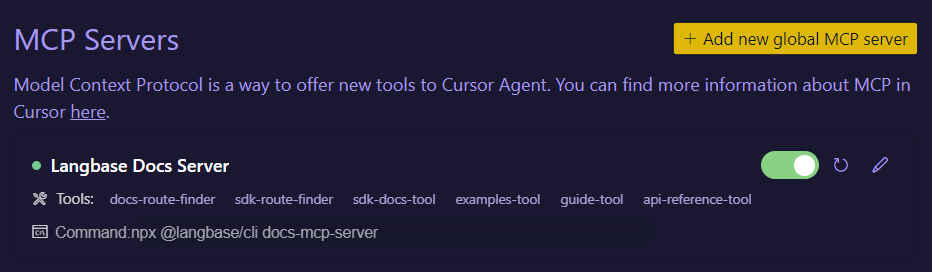
We will setup the MCP Server on any of the IDEs below and Claude Desktop.
- Open Cursor settings
- Navigate to the MCP settings
- Click on the
+button to add a new global MCP server - Paste the following configuration in the
mcp.jsonfile:
mcp.json
{
    "mcpServers": {
        "Langbase Docs Server": {
        "command": "npx",
        "args": ["@langbase/cli@latest","docs-mcp-server"]
        }
    }
}
Now that you have set up the MCP server, here are some example queries you can try:
Example queries
How to create a pipe agent named 'summary-agent'?
How to add memory to my summary-agent?
You can also ask about:
- How to update existing pipe agents
- How to use new AI primitives
- Different agent architectures
- Build something cool with Langbase APIs and SDK.
- Join our Discord community for feedback, requests, and support.